Introduction
This series will demonstrate how to use your web browser to make music! Thanks to the Web Audio API, modern web browsers have the ability to become a synthesizer. With the Javascript library Theresa’s Sound World (TSW) created by Stuart Memo, we can easily use the Web Audio API. Let’s get started!
Part 1 – What makes a sound?
The Web Audio API uses basic elements to create sounds – oscillators and filters. These are much like the early analog synthesizers. On these instruments, knobs and switches would be used to set up the oscillators and filters. In addition, patch cords would be used to connect the oscillators in different ways to make new sounds. We will start with using a single oscillator.
TSW provides an oscillator method which you can use to create a new oscillator node as follows:
[cc lang=”javascript”]
var osc = tsw.oscillator (frequency, wave_type)
[/cc]
The frequency represents the frequency of the pitch to be played. The wave type is a text string and can be one of four values (‘sine’, ‘square’, triangle’, ‘sawtooth’). If no parameters are entered, the default is a 400 Hz sine wave oscillator. Here are some examples:
[cc lang=”javascript”]
var osc = tsw.oscillator (600, ‘sawtooth’); // Creates a 600 Hz sawtooth wave
var osc = tsw.oscillator (800, ‘sine’); // Creates a 800 Hz sine wave
var osc = tsw.oscillator (1200, ‘square’); // Creates a 1200 Hz square wave
var osc = tsw.oscillator (550, ‘triangle’); // Creates a 550 Hz triangle wave
[/cc]
A table of pitch to frequency mappings can be found at http://peabody.sapp.org/class/st2/lab/notehz/.
We can change the volume of the tone we will create by using a gain node:
[cc lang=”javascript”]
var volume;
volume = tsw.gain(0.25); // Set volume to 0.25 of normal
[/cc]
Once the oscillator node is created, the node needs to be connected to the final output node, called “speakers”. This is done using the connect method as follows:
[cc lang=”javascript”]
tsw.connect (osc, tsw.speakers);
[/cc]
Finally, the note is started by calling the start method of the oscillator node object:
[cc lang=”javascript”]
osc.start();
[/cc]
To stop the note, call the stop method for the oscillator:
[cc lang=”javascript”]
osc.stop();
[/cc]
Let’s put this data and two functions (turn_on and turn_off) together in a file which can then be loaded from a web page (save as pitch.js):
[cc lang=”javascript”]
var osc;
var volume;
volume = tsw.gain(0.5);
function turn_on() {
osc = tsw.oscillator (600, ‘sawtooth’);
tsw.connect(osc, volume, tsw.speakers);
osc.start();
};
function turn_off() {
osc.stop();
};
[/cc]
Note that the oscillator is defined in the function turn_on instead of when the parameter osc is declared. There is a reason for setting up the oscillator this way. In the Web Audio API, once an oscillator is turned off or disconnected, it can no longer be used. If the oscillator was defined when the parameter osc was declared, it could not be started again if the user turns the oscillator on and off. With this design, a new oscillator instance will be created each time that the turn_on function is called.
Now we will use the Bootstrap user interface toolkit to create our application. We will use the starter-template file from the Bootstrap examples site. In the <head> element, make the following changes:
FROM:
[ccie_html]
<!– Bootstrap core CSS –>
<link href=”../../dist/css/bootstrap.min.css” rel=”stylesheet”>
[/ccie_html]
TO:
[ccie_html]
<!– Bootstrap core CSS –>
<link href=”http://maxcdn.bootstrapcdn.com/bootstrap/3.2.0/css/bootstrap.min.css” rel=”stylesheet”>
<script src=”tsw.min.js”></script>
<script src=”https://ajax.googleapis.com/ajax/libs/jquery/1.11.1/jquery.min.js”></script>
<script src=”pitch.js”></script>
[/ccie_html]
Remove the following HTML from the <head> element:
[ccie_html]
<link rel=”icon” href=”../../favicon.ico”>
<!– Just for debugging purposes. Don’t actually copy these 2 lines! –>
<!–[if lt IE 9]><script src=”../../assets/js/ie8-responsive-file-warning.js”></script><![endif]–>
<script src=”../../assets/js/ie-emulation-modes-warning.js”></script>
<!– IE10 viewport hack for Surface/desktop Windows 8 bug –>
<script src=”../../assets/js/ie10-viewport-bug-workaround.js”></script>
<!– HTML5 shim and Respond.js IE8 support of HTML5 elements and media queries –>
<!–[if lt IE 9]>
<script src=”https://oss.maxcdn.com/html5shiv/3.7.2/html5shiv.min.js”></script>
<script src=”https://oss.maxcdn.com/respond/1.4.2/respond.min.js”></script>
<![endif]–>
[/ccie_html]
Now replace the HTML within the <body> element in the div with with the following HTML to set up the buttons to call the two functions in pitch.js:
FROM:
[ccie_html]
<div>
<div>
<h1>Bootstrap starter template</h1>
<p class=”lead”>Use this document as a way to quickly start any new project.<br> All you get is this text and a mostly barebones HTML document.</p>
</div>
</div><!– /.container –>
[/ccie_html]
TO:
[ccie_html]
<div>
<div>
<p>Press Play to hear how the pitch sounds. <button onclick=”turn_on();”>Play</button></p>
<p>Press Stop to turn it off. <button onclick=”turn_off();”>Stop</button></p>
</div>
</div><!– /.container –>
[/ccie_html]
Finally, replace the links at the bottom of index.html with the following:
FROM:
[ccie_html]
<!– Bootstrap core JavaScript
================================================== –>
<!– Placed at the end of the document so the pages load faster –>
<script src=”https://ajax.googleapis.com/ajax/libs/jquery/1.11.1/jquery.min.js”></script>
<script src=”../../dist/js/bootstrap.min.js”></script>
[/ccie_html]
TO:
[ccie_html]
<!– Bootstrap core JavaScript
================================================== –>
<!– Placed at the end of the document so the pages load faster –>
<script src=”http://maxcdn.bootstrapcdn.com/bootstrap/3.2.0/js/bootstrap.min.js”></script>
[/ccie_html]
Load up the HTML file index.html in your browser (the file does not have to be uploaded to a web server). You should see the following:
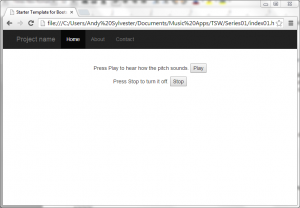
Click on the Play button, and you should hear the pitch. To turn off the pitch, click the Stop button.
You did it! You are making sounds in your browser using the Web Audio API. If you do not hear anything, check the HTML5Test website to see if your browser supports the Web Audio API. You can also go to the demo of this application and see if you can use that to hear the pitch.
Download the source code for all of the examples in this series from Github.


