Use case: linkblogging from your phone

I use my RSS reading app to graze stories from the feeds I am following. After scrolling through the list, I have a set of browser tabs open to read. After reading, usually I have several tabs (or perhaps a lot of tabs) for which I would like to save the links. Many times in the past, I have copied them to a “link dump” file. However, another approach is to use a linkblogging tool to capture the links.

My tool of choice in this situation is MyStatusTool (my live version is here). Here is a screenshot from my phone browser:
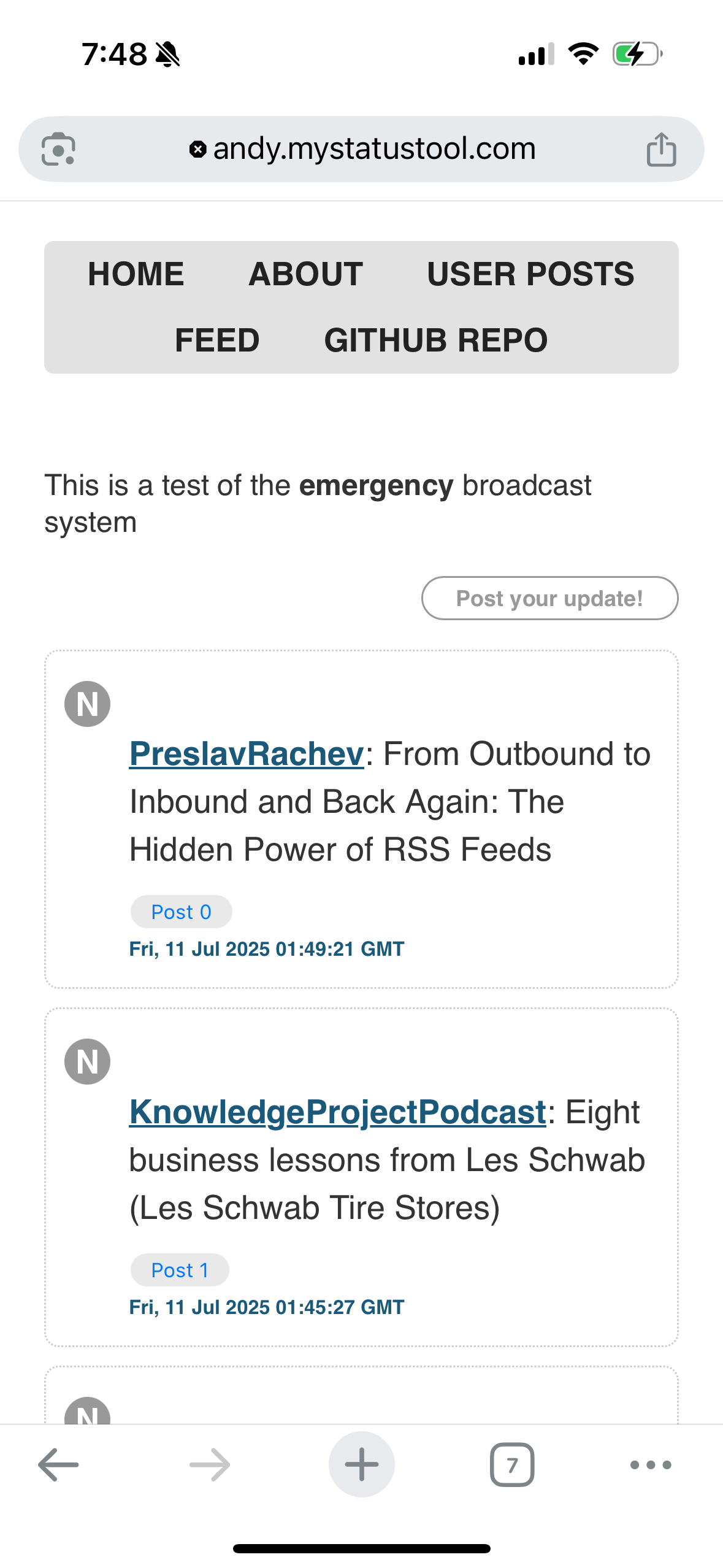
The area above the “post your update” button is the text area to enter a post. MyStatusTool uses the medium-editor toolbar to make it easy to add a link. The most difficult thing is to select the link text and get the medium-editor toolbar to appear (usually I double-tap the text). It is also best to only link to a single word (again, selecting several words as the link text can be difficult). The tool also creates a view of user posts, so you can review just your posts and not all of the content from subscribed feeds.

If anyone is interested in installing MyStatusTool, let me know! More information is available at The Feed Network.

Taking steps to build a feed-based social network

In a previous post, I mentioned that my vision of a feed-based social network included the use of rssCloud as the notification system within RSS feeds. Back in 2022, I did some investigation regarding support of the rssCloud protocol in WordPress.com and WordPress.org sites, and using FeedLand as the most prominent feed reader supporting the rssCloud protocol. It turned out that although WordPress.com sites had included support for rssCloud since 2009, and WordPress.org sites through the use of the RSS Cloud WordPress plugin, there was some misunderstanding about what a client needed to do to register with the WordPress rssCloud support. This Github gist goes into the details, but to summarize, the client trying to register with WordPress needs to be running on port 80 or 443 to be recognized. Both Feedland and the River5 feed reader (the two prominent feed readers supporting rssCloud notification) did not necessarily run on those ports, and as a result the “real-time” notification of rssCloud did not occur. Those feed readers were able to read the WordPress RSS feed and display updates, but not in real-time.

FeedLand was updated and now supports WordPress rssCloud registration. As part of that effort, Dave Winer created a rssCloud server demo project to use to check rssCloud server implementations. I decided to check this out with a WordPress.com site and a WordPress.org site using the RSS Cloud plugin. On my server, I am using the Caddy web server, and had some subdomains being hosted through Caddy. I updated the rssCloud demo code to use the port I am running on, and to use one of those subdomains with Caddy doing a reverse proxy so that the app would appear to be running on port 80. My test was successful! I was able to see the app register with both the WordPress.com and WordPress.org sites, and to see the app respond when the sites notified the app of a new post. Here is my copy of the main app and the stats file created by the app.

This is an important step in creating the feed-based social network I have in mind. WordPress is the largest generator of RSS feeds supporting rssCloud, so it is important to understand how the WordPress rssCloud implementation works to make sure that apps interacting in this social network can get real-time updates from WordPress sites.

Musing about podcast subscription/listening lists

What is a podcast subscription/listening list? Well, let’s start with talking about subscription lists. For most, if not all podcast clients, OPML files containing a list of the podcast feeds being monitored have been the defacto standard for import/export of podcast feed lists. Prior to use in podcast clients, OPML files have been used as a defacto standard for import/export of feed lists for feed aggregator apps.

As far back as 2012, Dave Winer was pushing for the use of OPML subscription lists within podcast apps. In this context, he wanted podcast apps to be able to subscribe to an OPML file with a URL, so that people could automatically get any updates to the OPML, and subsequently, anything new would be added to their podcast app.

In the fall of 2024, Dave Winer brought up this idea several times and later created a page describing this idea in more detail, and calling it “listening lists”. Dave Winer created a Github issue to collect feedback on this idea, and Dom Christie suggested the following:

I have been wondering if the episodes from curated lists could be published in their own RSS feed? That way, users (and not just podcasters) could created their own feeds, listenable in any app.

That same day, Dave Winer linked to a page describing a RSS feed made up of first episodes of fiction podcasts. An overview page lists the podcast episodes and also provides audio players for them – neat! From the looks of it, this is a made-by-hand page, although there could be some tool or tooling involved.

This suggests several ideas to me:

  • App to create a podcast feed which merges a list of other podcast feeds
  • App to allow users to create a podcast feed of podcast episodes that they select (it could include the ability to host the created feed)

I did some experiments over the holidays with Dave Winer’s RSS NPM module to create a podcast feed of some audio files that were not organized as a podcast. However, the experiment shows how this type of feed can be created. I am going to start working on this concept. If anyone reading this is interested in collaborating, let me know!

Followup on creating WordPress podcast feeds

In November 2024, I wrote a post about an issue I discovered in trying to create a WordPress category feed for a set of audio posts. The category feed had issues in being recognized by a podcast app. I found that when I set the post type/format as “Audio” in the WordPress editor, the category feed could be recognized by a podcast app.

Last month, I noticed a tweet by Ken Smith that some WordPress themes do not have the support in the editor interface for the post type/format. He linked to a video (shown at the end of this post) showing how to modify WordPress files to add this feature to a theme if not present. I checked some of my older WordPress websites, and found that several of them had this issue. I appreciate Ken bringing this to a wider attention.

Making your own media

A few days ago, Dave Winer talked about “making your own media”, meaning that individuals could create lists of sources and distribute them. Dave called for Democratic podcasts, but he has a podcast “river of news” site with multiple podcasts. I thought – why not create a river of news site for some other list of sources as an example?

I recently became aware of a blogging challenge called Blaugust (during the month of August, natch!). On their media page, they had a link to an OPML file of all the participants. I copied that file, added it to my River5 subscription list, and created a river of news site for that list of bloggers. I have instructions on how to do this for yourself – so get busy!

Updating my River5 install

I have had some problems recently in getting the web reader feature in my River5 RSS reader install to work. Since I recently revised my main subscription list to create a blogroll OPML file, I decided it would be good to perform a clean install and start fresh with a smaller set of feed lists. I am recording the following steps to document my work.

  • Completed backup of current river5 folder from server
  • Saved my latest feed list as readinglist.txt
  • Found post about River5 callbacks, could not find my callback script
  • Looked at artcasting site, saw how I used a modified form of riverbrowser.js to display the pictures
  • Deleted river5 install on server
  • Uploaded clean River5 install from Github to river5 folder on server
  • Updated package.json to recent changes (allowing latest Node.js version)
  • Updated config.json to current content (removing initial tab setup from Github, setting max number of items in a river, setting podast download flag to FALSE
  • Updated lists folder
  • Added exampleRiver4Callback.js from C:\NodeApps\Rivers to callbacks\addToRiver folder on server
  • Did npm install, no issues
  • Did forever stop river5.js (had to, since server would not allow me to run new app)
  • Did node river5.js, watched startup in Putty, saw web view of lists
  • Did forever run river5.js
  • Checked my reading list app, saw new river file, all is well!