
Meanwhile, the tools of The Feed Network are there for people to set up their own social networks with real-time notification. If anyone needs help with setup, let me know!
Feeds
There are 125 posts filed in Feeds (this is page 4 of 13).
Dave Winer brings up “Twitter as a service” (real-time Internet-scale notification with an easy to understand user interface) and that Amazon should have done this. Well, they didn’t, but lots of other people are building services, maybe it will happen…
What does the phrase “open social web” mean?
Last week (June 5-7th, 2025), the Fediforum unconference was held online, with keynote speakers and open sessions for attendees to present demos of new products and discuss topics related to the “open social web”. There have been many posts about the open social web, and how this technology or that protocol is part of the “open social web”. I felt it would be good to step back for a moment and try to understand what the phrase “open social web” means.
To begin, I will look at the word “open”. To me, the opposite of this word is “closed”. Dave Winer recently referred to Twitter and Facebook as “closed” systems, and referred to Unix as an “open” system. I think this comparison is in the context of “open for people to develop for the platform and use it however they want”. In this context, Mastodon and WordPress are open systems, in that the code base is “open source“, meaning available for users/developers to modify and improve, and to run their own copy of the software. Another content of the word “open” could also include the ability for users of a platform/software stack to interact with other users of the web outside that platform/software stack. A common complaint about Twitter and Facebook is that users cannot link directly to other locations on the web within a post. This is a “feature” of a “silo”, where “users” are “trapped” (note the use of quotes in this sentence – links to these topics are left as an exercise for the reader). Another possible context for an “open” system could be the ability/possibility for a person or company to purchase the platform and take it in a different direction (Twitter).
Next, I want to examine the use of the word “web”. As mentioned in the previous paragraph, linking is a basic tenet of the World Wide Web. If a system/platform/application that operates on the Web does not allow linking, that system/platform/application is not supporting the World Wide Web. Dave Winer has also captured some other fundamental features of writing on the web, which includes links. However, the link is the fundamental feature. If an application does not allow linking, is it really part of the World Wide Web, or is it just a “silo” service trying to trap users into staying on its platform because of the network effect.
Finally, we come to the word “social”. To me, being “social” means communication with others. This communication can occur in real life or online. Going back to the services/applications, my view of “social media” is it is a way for a person to broadcast messages to many people, and to have interaction/communications with many people. Tools/applications/platforms like Twitter, Facebook, Mastodon, Bluesky, and many more are facilitating this type of communication. Some people interact with a small group of people. Some people seem to want to have as big an audience as possible. When a person has an account on a service/application/platform which indicates that millions of people are reading/watching/monitoring the messages from that person, this communication approaches the reach of so-called “mass media” (think TV/radio/cable networks). Whether this is good or not, I do not know. However, this is the social media world that exists today. All of the tools mentioned in this post have a “social” aspect to their publishing. For blogs, use of RSS provides a way for people to “follow” authors without the “instant” feedback of Twitter/Facebook/etc, but it is a social application. There are ways to speed it up (see The Feed Network for some examples), but it does not have to be that way. Also, the abundance of social media platforms can bring fatigue (see essays by Molly White and Mandy Brown).
In all of this, it is important to remember that different people use tools in different ways for different purposes. For some people, the “open” part of “open social web” is the most important. For many people, having the ability to have “social” interactions with many people and to do it in an easy way is the most important. Finally, as Doc Searls righteously points out about podcasting (but also applies to the Web): “Nobody owns it, Everybody can use it and Anybody can improve it. That means anybody and everybody can do wherever they want with it. It’s theirs—and nobody’s—for the taking.” I think people should keep this in mind when starting to find fault or criticize how people or groups are innovating in web technologies. Let’s work on making great things!
It’s great that someone wants to build an open social web on WordPress, but there is already an open social web that uses WordPress – The Feed Network!
It’s great that someone wants to build a social web network around RSS, but it already exists – The Feed Network!
Announcing – The Feed Network
In recent posts, I have been giving updates on my work to set up a feed-based social network using rssCloud as the notification protocol. The initial site to support this is now complete – The Feed Network at https://FeedNetwork.Social.
The site has a page on how to get started, a set of questions and answers, and a tool catalog listing the tools that support rssCloud. This is an effort to show that other technologies exist that can create the foundation of a social network.
For more info, go to The Feed Network, or check out our introductory video, or follow our blog feed for updates!
Updates on building a feed-based social network
In a previous post, I mentioned that I was able to use a reference app to test rssCloud support for WordPress.com sites and WordPress.org sites. Since then, I have migrated some of the features in the reference app into a demo instance of MyStatusTool, the app I developed in 2022-2023 to provide a Twitter-like experience using rssCloud for notification. Here is a screenshot of the demo instance:
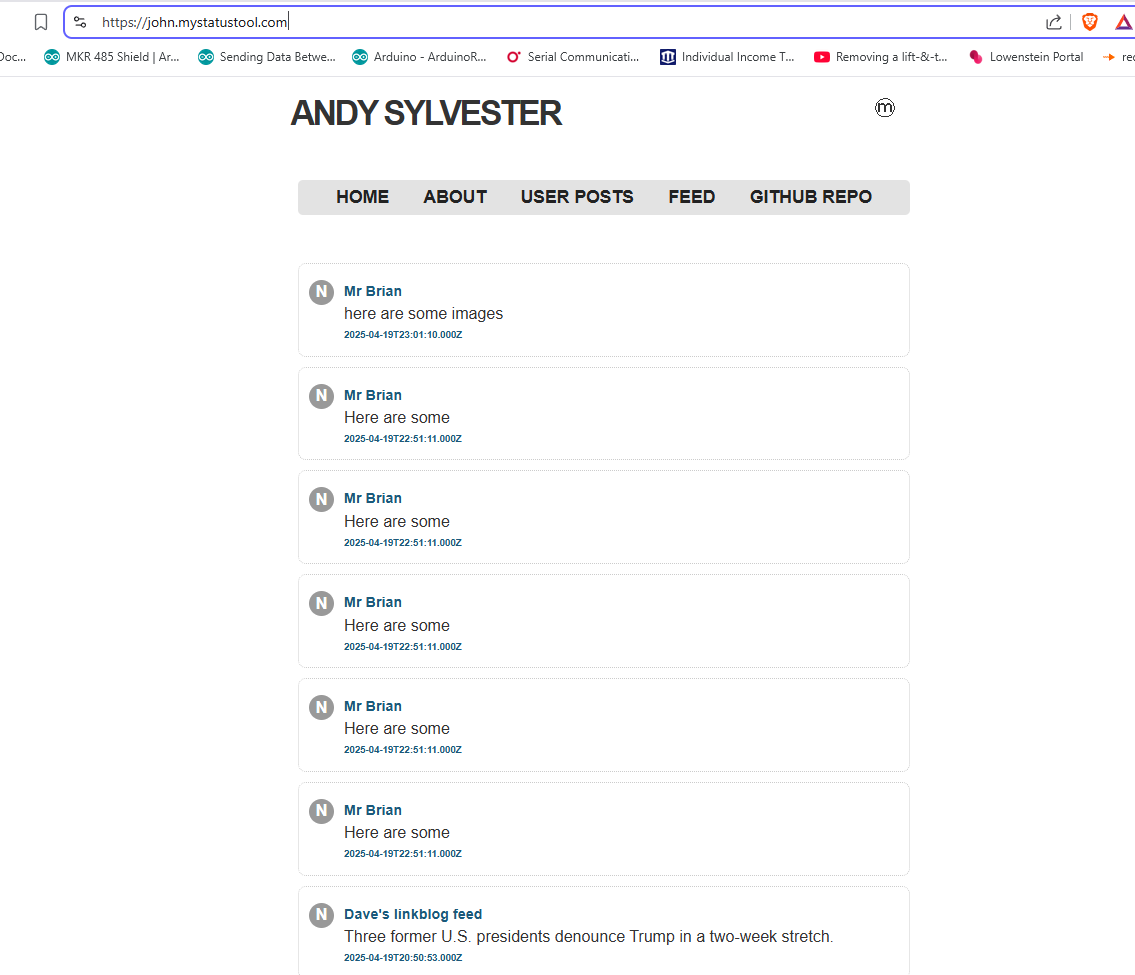
Currently, the app is subscribed to 11 WordPress.com sites, 1 WordPress.org site, and 6 non-WordPress sites. I did perform tests to confirm that all of these three types of rssCloud sites appeared within seconds on my demo instance. Woohoo! I will let this demo instance run for several days to check the re-subscribe function, but I think this is a good enough start to plan for a rollout of the feed-based social network.
My thoughts on Inbound RSS
Dave Winer recently wrote a summary of what he calls “Inbound RSS”, and Rob Fahrni and Manton Reece also contributed to the conversation. Rob had a great one-line summary in this Bluesky post:
Basically when you publish RSS that’s outbound. If you read it and do something with it, that’s inbound.
Now, where are some examples of this “in the wild” – who has this deployed? And why should we care?
As far as I know, the only service/tool that takes a RSS feed as an input and allows users to publish based on the content of that RSS feed is the Micro.blog service. I take advantage of this to publish posts from my WordPress blog that I want to appear on the Micro.blog timeline. Some platforms allow users to post via email (I found WordPress and Blogger, after a quick search). However, my impression is that people who have blogs use the interface provided within the blogging tool to create posts, and few people use alternate methods to post. So, from a quick search session, one blog tool that takes RSS as input to create posts.
In Dave Winer’s post, we can see that he wants to be able to post to other services (Substack, Twitter, Mastodon, Bluesky) by using an editor of his choice and providing a RSS feed to the service, which is then processed by the service into posts. This becomes even more clear after searching his blog for mentions of “Inbound RSS”. My response is: Good luck with that! Why should those services care, or make this available to users? What is the “win” for them. Moreover, what is good for the goose should be good for the gander, right? Of the blogging tools that Dave Winer has developed (1999.io, Old School tool within Drummer, Fargo), none of them has supported this feature. Why not?
In conclusion, I think that “Inbound RSS” as a publishing technique can be implemented by anyone (it’s only software, right? we can do anything in software, right?). Whether there is a business case for this, or a market for this, is for me an open question.
Reference: Paying for the development of software
Taking steps to build a feed-based social network
In a previous post, I mentioned that my vision of a feed-based social network included the use of rssCloud as the notification system within RSS feeds. Back in 2022, I did some investigation regarding support of the rssCloud protocol in WordPress.com and WordPress.org sites, and using FeedLand as the most prominent feed reader supporting the rssCloud protocol. It turned out that although WordPress.com sites had included support for rssCloud since 2009, and WordPress.org sites through the use of the RSS Cloud WordPress plugin, there was some misunderstanding about what a client needed to do to register with the WordPress rssCloud support. This Github gist goes into the details, but to summarize, the client trying to register with WordPress needs to be running on port 80 or 443 to be recognized. Both Feedland and the River5 feed reader (the two prominent feed readers supporting rssCloud notification) did not necessarily run on those ports, and as a result the “real-time” notification of rssCloud did not occur. Those feed readers were able to read the WordPress RSS feed and display updates, but not in real-time.
FeedLand was updated and now supports WordPress rssCloud registration. As part of that effort, Dave Winer created a rssCloud server demo project to use to check rssCloud server implementations. I decided to check this out with a WordPress.com site and a WordPress.org site using the RSS Cloud plugin. On my server, I am using the Caddy web server, and had some subdomains being hosted through Caddy. I updated the rssCloud demo code to use the port I am running on, and to use one of those subdomains with Caddy doing a reverse proxy so that the app would appear to be running on port 80. My test was successful! I was able to see the app register with both the WordPress.com and WordPress.org sites, and to see the app respond when the sites notified the app of a new post. Here is my copy of the main app and the stats file created by the app.
This is an important step in creating the feed-based social network I have in mind. WordPress is the largest generator of RSS feeds supporting rssCloud, so it is important to understand how the WordPress rssCloud implementation works to make sure that apps interacting in this social network can get real-time updates from WordPress sites.
Dave Winer has created a new Bluesky account for political news, and is planning to create a “river of news” site for feeds (placeholder here). Dave has other news rivers (as well as my news rivers for general feeds and WordLand users), so nothing new here in terms of technology but good to get more rivers out there. I applaud any effort to “own your social net“.
UPDATE 3/31/2025: Dave Winer changed the URLs for the Bluesky account and the placeholder site (see reference)