
Just added the ActivityPub Plugin for WordPress, making a test post to try it out…
Blogging
There are 133 posts filed in Blogging (this is page 2 of 14).
Someone who does not believe that blogs should have comments has commented on a blog and then blogged about it – hypocrisy?
Dave Winer is collecting posts from John Palfrey and posting them at this site, but the site is not visible, yet Dave is linking to it – can someone tell him about this problem?
Dave Winer – stop telling us what you are going to show in your new stuff, and just show us the beef!
I just found out my hosting service (Bluehost) changed my plan to limit me to 20 websites – ugh! Does anyone have any recommendations for shared hosting with no website limits? Thanks!
Embracing creativity
Dave Winer wrote recently about “embracing the creativity of others“. It sounds good, but I don’t think he is taking his own advice. Dave regularly posts about how ActivityPub and AT Protocol are too difficult, and the developers supporting those protocols should support RSS, or should implement inbound/outbound RSS. Sure, that works for RSS developers, but what’s in it for ActivityPub or AT Protocol (or for Mastodon or Bluesky or Threads or….)? Where is the win for them? It seems like Dave Winer is looking for someone to say that his work with WordPress (the WordLand editor) is great. Well, it is a nice editor, but so what if people are not rushing to take advantage of it? Keep working at it, and PLEASE show us all that stuff about FeedLand and WordLand integration, instead of just talking about it!
Thoughts on the “Winer WordPress Tease”
Dave Winer has been promoting his editor for WordPress sites, called WordLand, leading up to his keynote speech at WordCamp Canada in October 2025, as well as hinting about other WordPress-related projects. Recently, he asked readers to “Think Different About WordPress“, where he talks about how WordPress supports editing features that Mastodon and Bluesky do not support (linking, no character limits, and other features). WordPress also has “excellent support” for RSS and rssCloud, and has a “deep and powerful API“.
Dave Winer goes on to say that he is providing three things to bootstrap a development community around WordPress: (1) Apps (I assume this refers to WordLand), (2) a storage service (I assume this refers to his wpIdentity NPM package, which he uses for identity for his FeedLand feed reader, and also to provide storage for user writing (although it appears to use the MySQL database associated with a WordPress install)), and (3) content (to me, this is RSS from other sites, implying some feed reader app or link to a feed reader app (like FeedLand)).
Now, how does a development community arise from this? Well, I guess that if people want to use an API to interact with WordPress (create posts, manipulate data in the WordPress database), they can do that, and maybe wpIdentity makes it easier to create Node.js apps that can interact with WordPress (like WordLand). As Dave Winer has mentioned before, though, the WordPress API has been around for a long time, but does not seem to have gotten much use. I am not sure if providing an easier “front end” to an API will increase use of that API. The WordLand app up to this point has been “the example app”, but has been provided as a service (no source code), so it is more of a “working example” for developers, not an app that some one can build on. Finally, Dave Winer has been hinting about an “RSS timeline viewer“, which is perhaps where FeedLand comes in. Again, without the full picture, it is hard to see how these three things are going to spark a growth in WordPress application development.
Finally, Dave Winer posted a podcast on “the last chance for the open web“, in which he talks about WordLand as “really easy way to write for the open web that does not otherwise exist today”, among other topics. I do not see this as the “last chance” for anything. I have written before on the economics of software development and on innovation in RSS and podcasting. The open web is still there, still providing a platform for innovative work. Nobody stopped me from creating MyStatusTool as a Twitter replacement based on rssCloud, and nobody stopped me from collecting rssCloud-based tools at The Feed Network. I know that Dave Winer would like his writing tools to be able to push their content to all social media platforms. Maybe that is the “promised land” that WordPress might provide via the ActivityPub plugin and an AT Protocol plugin (not yet developed). We will have to wait and see…
Shouldn’t RSS feeds have link URLs?
An interesting note – I wanted to link to the entry at links.daveverse.org for a particular link. I went to the site, did not see an easy way, so I went to the RSS feed linked at the bottom of the site. To my surprise, the feed listed items pointing to the links.daveverse.org item, but that item did not have the URL related to that item. I finally found them at https://dave.linkblog.org/. However, this seems to be at odds with Dave Winer’s own description of what a linkblog feed should be – what’s up with that?
Use case: linkblogging as curation
I have experimented with several methods of curating links:
- Zettlekasten/directory of links organized by categories (used Drummer, created a OPML file, rendered by the “this.how” feature within Drummer)
- Website using categories (used Hugo, with Fluency theme, each link had a page, used tags for classification)
- WordPress (used Links category to collect just links)
My struggle is – am I just collecting stuff? This article talks about how to break that cycle, I should read it again….
Use case: linkblogging from your phone
I use my RSS reading app to graze stories from the feeds I am following. After scrolling through the list, I have a set of browser tabs open to read. After reading, usually I have several tabs (or perhaps a lot of tabs) for which I would like to save the links. Many times in the past, I have copied them to a “link dump” file. However, another approach is to use a linkblogging tool to capture the links.
My tool of choice in this situation is MyStatusTool (my live version is here). Here is a screenshot from my phone browser:
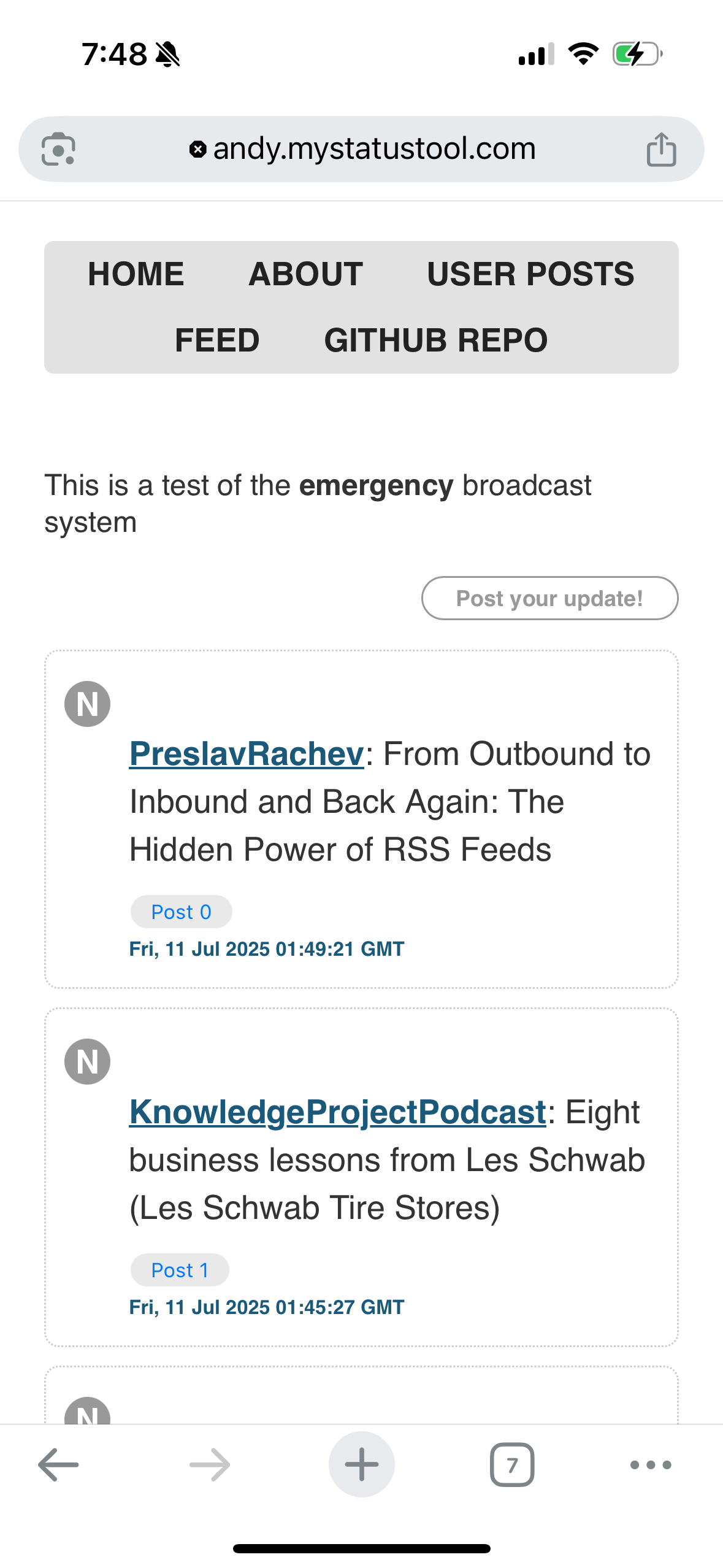
The area above the “post your update” button is the text area to enter a post. MyStatusTool uses the medium-editor toolbar to make it easy to add a link. The most difficult thing is to select the link text and get the medium-editor toolbar to appear (usually I double-tap the text). It is also best to only link to a single word (again, selecting several words as the link text can be difficult). The tool also creates a view of user posts, so you can review just your posts and not all of the content from subscribed feeds.
If anyone is interested in installing MyStatusTool, let me know! More information is available at The Feed Network.