
Today was the first day I had some spare time to look at the Reaper digital audio workstation software that I am planning to use with my Alesis V49 MIDI controller keyboard. I decided to watch the first video in the series “First MIDI Song in Reaper (1/8) and try to duplicate the steps. The first part involved downloading and installing some plugins for a piano sound and a synth sound. Both of those took a little more time than I thought it would (some of the installation steps had changed, and not all of the steps were given, so I had to do some sleuthing to get the files in the correct directories). The next set of steps were for creating a track, playing a short melody on the MIDI controller, then editing that track. Well, my piano skills are not that good, so THAT took a while (mostly on editing what I entered to match what the video had). The final part was to add two more tracks to add chords and pad sounds. I have not done this last part yet, but I am getting there….one step at a time…with some missteps and backtracking….
Music
There are 42 posts filed in Music (this is page 3 of 5).
MIDI controller debugging for Alesis V49
In an earlier post, I mentioned I bought an Alesis V49 MIDI keyboard controller. However, when I tried to use it with multiple programs, they appeared to recognize it in the settings/preferences area, but would not detect any key-up/key down data. After a lot more experimenting, I figured out that I was selecting the wrong thing in the settings/preferences menu. Here is a screenshot from Reaper:
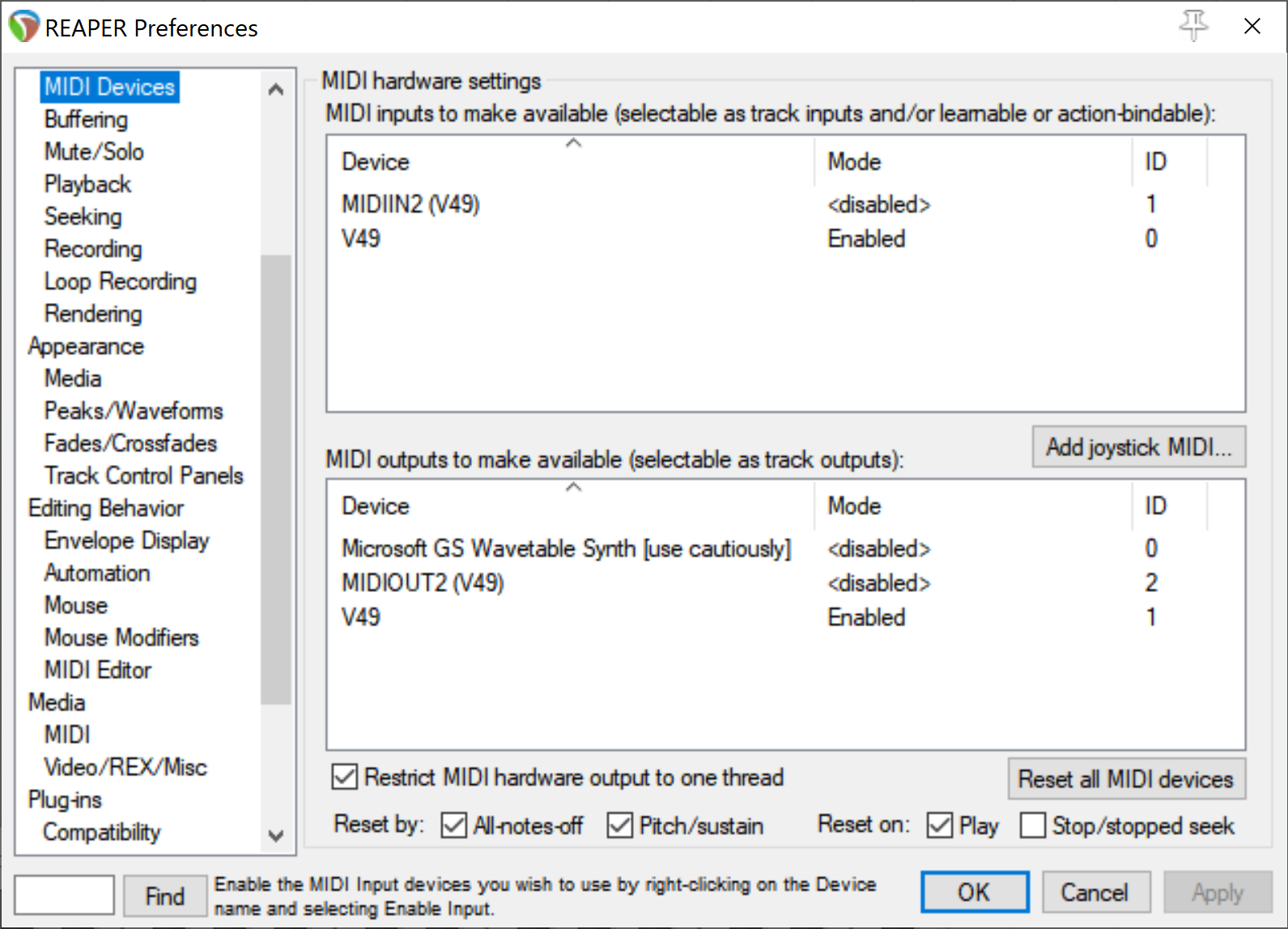
The upper part of the window deals with inputs, the bottom part deals with outputs. There were two entries for each part (MIDIXX2 (V49) and V49). I did not have any instructions, so I selected the first one (MIDI…). Well, that was INCORRECT! I needed to select the “V49” entry. Once I stumbled onto that key fact, all of the DAW apps were able to detect key input.
The moral: keep trying different options until something works!
Getting started with MIDI controllers
I did buy an Alesis V49 MIDI controller, so the next step was to hook it up. However, the programs I tried (Reaper, LMMS) did not seem to work with the controller. I was able to see the controller as an option in the Preferences/Settings pages for these apps, and was able to select them. However, when I followed the EXACT instructions from web pages and videos from these companies, there was no sound when I would press a key on the keyboard, and no indication that the program was detecting the key presses. I downloaded the MIDI utility program MIDI-OX, which indicated that my Windows 7 laptop was receiving key-on and key-off data, so it seemed like everything was working – but it wasn’t!
I then went to the store (Guitar Center) and talked with the “Pro Tools” employee, who showed me what a working setup should look like (he was using a different controller than mine and a copy of Ableton Live for the Mac). He said it was likely a software problem (what! I AM a software engineer!), and that it took him several months to get the hang of using digital audio workstation (DAW) software.
Frustrated, I decided to download a copy of Ableton Live Lite (since my MIDI controller had a license code for a free copy), and … after a 20 minute download and a 20 minute installation, I was able to use my controller to play some notes in Ableton Live Lite – FINALLY!
Now, what did I want to do with this controller…..?
Some thoughts on first-run experience for software apps
In the past two days, I installed three digital audio workstation applications on my Windows laptop (Ardour, LMMC, Reaper). In each case, I just downloaded the latest version, did the install, then started the app. For Ardour and Reaper, both of them wanted me to select an audio input device (well, I didn’t have one!). I just clicked on something to get to the main app. For Ardour, I had to quit and try again, since the thing I clicked did not meet the app’s expectations. Only LMMC was able to start without some dialog popping up. For all three apps, I was then faced with a screen filled with various subwindows and a menu bar. What to do now?
Now, I will admit that these types of programs are complex, and require the user to know a little something about what they want to do, or how to use them. But when you compare this with many smartphone apps, there are usually some choices you can make from just looking at the screen to get started. Sure, each of the programs has some “getting started” resource (Ardour, LMMC, Reaper), but it might be nice for the app to have some built-in starter setup or task accessible from a menu (or something!). Just my two cents…
Dear Lazyweb: any recommendation for MIDI controllers? I am looking at this one, but open to input from others.
Computer music formats
I am trying to collect some information on music formatting languages/tools to assist me in doing some algorithmic music composition.
MusicXML – granddaddy of them all (used by Finale, Sibelius, many other music notation software applications)
Collection of formats – Interesting site with extensive collection of formats
Music JSON proposal – GitHub repo with a proposal for notating music in JSON
Using LilyPond as input to Tone.js – Will have to look at this some more…
Musescore – open source music notation program
VexFlow – open source music notation program that uses VexTab as a music notation language
OpenMusic – a visual music composition language, with applications available for Windows, Macintosh, and Linux.
JAMS – JSON Annotated Music Specification Github repo (other docs)
musicxml-interfaces – NPM library for parsing MusicXML to JSON
musicjson – NPM library for converting MusicXML to MusicJSON and back again
W3 Music Notation – community group
Looking for some music tools to try
I am looking for a music production/DAW tool. I have done some playing around with the Web Audio API (see my series of articles on Theresa’s Sound World, and exploration of the Tone.js library), but found it difficult to use those tools for music composition. Some apps I am going to review (Windows versions) are:
My main interest is in algorithmic composition, so I am hoping to find a tool that can be scripted or programmed, or accept input files generated by a script or program. A tool I once looked at was Pyknon, a Python library for generating MIDI files, in conjunction with the book Music for Geeks and Nerds. If any of my three readers has any suggestions, let me know!
Read: Leon Redbone has died
I remember the first time I saw Leon Redbone, it was on Saturday Night Live, playing “Champagne Charlie”.
In honor of Memorial Day, a performance by the The U.S. Navy Band Sea Chanters of “Eternal Father, Strong to Save,” the Navy hymn, July 27, 2012.
Check out these videos of the theme songs for “The Jeffersons” and “All In The Family” from the ABC special on Wednesday, May 22!